Well, Antipodes is about music servers: high-end digital music servers/streamers designed for ultra-clean, high-resolution audio, that’s what they do best. Network Acoustics on the other hand is all about networks: Reducing noise in the Ethernet path before the streamer to improve sound quality… Network Acoustics can look with you at your network topology and the remaining weak point.
Those who play their music locally from the SSD via Squeeze/Squeeze?
When he needs updates, maybe he can temporarily reconnect the Fritz!Box or connect the small router to the internet for a moment.
While his exact experience is rare, the underlying principle that upstream electrical and RF behaviour can influence highly resolving audio chains is well known to those working with ultra-quiet networks like yours? I think Christian needs to clean the electrical environment more than expected so that the playback hardware can perform at its full potential.
You have eliminated downstream causes. The persistent variable in your tests is the access point function upstream. Different controllers change RF and background traffic, the access point reacts electrically to that, and because the AP is tied into your audio network some tiny electrical behaviour still reaches the K50. That is the simplest explanation that fits everything you reported.
Sure that can be done if avoiding the Fritzbox solves his problem.
Or maybe he can just regularly choose to control playback using the device that gives him the best sound.
1 Like
Would it be worthwhile to use Wireshark for this?
With Squeeze/Squeeze, data is constantly being transmitted to the K50’s IP address.
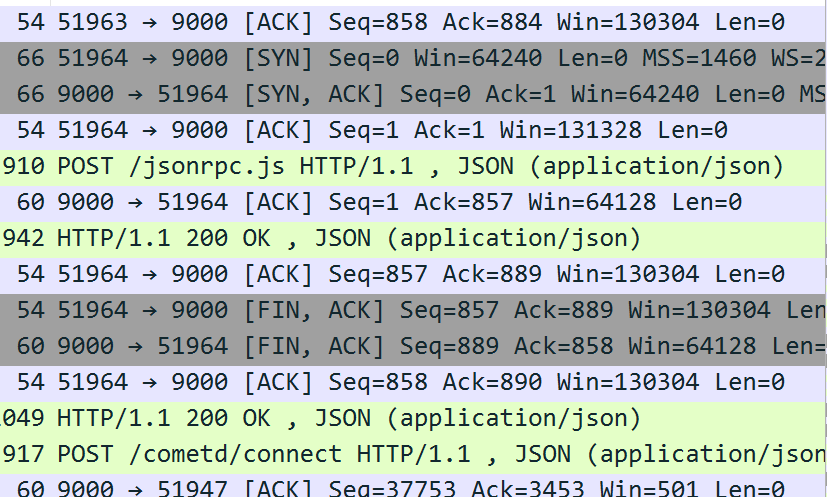
Developer Tools in Chrome showed the same thing. I suspect that all that Wireshark would do is confirm that when Squeeze is run from a browser, interaction with the server is the same regardless as of device so it’s not the controller itself that’s causing the sound to be different
1 Like
What if the reason that @Christian is hearing differences from different devices is because he has so successfully reduced the noise in his network that now these can be heard? That could mean further reducing noise might only make their differences more apparent.
This is why I think it’s essential to determine root cause before coming up with the solution.
Well, as you said, if that were the case, Christian would not be the only one able to hear it.
agreed
What you describe about HTTP and Squeeze is correct at the protocol level. The controller only sends a tiny command and then stops. If we were only talking about data flow your explanation would close the topic.
But Christian’s situation is not about data. It is about the electrical behaviour of the access point in his specific environment.
It is not about who gives the play command. It is about how the access point reacts electrically to the presence of different devices on the network.
You are right that once a system becomes very quiet new variables can become audible. But that does not mean the solution is to chase those variables. It means the upstream environment has not actually been neutralised yet.
If the access point still reacts electrically to different controllers, and that behaviour still reaches the K50, then the upstream noise is not reduced enough. In a properly isolated setup the access point would not influence the sound at all, no matter which device is used as a controller. Many others have been reporting that too.
What Christian is hearing is not the sound of an over optimised network. It is the sound of the last non isolated part of the system still leaking its behaviour into the audio chain. The differences appear because the access point is still part of the electrical environment.
That is why the root cause keeps pointing to the same place every time. And once that part is properly taken care of the differences will not become more obvious, they will disappear.
But if the one other person who heard it has been as successful as Christian had at reducing noise then that would be proof that this is what lead to them hearing the impact their control device was having.
When I first auditioned an audiophile Ethernet cable, I didn’t hear a difference. But that was because I was using noisy Mac Mini as my server. Many things became audible the more that sources of noise were eliminated.
Sorry I missed it, but how was this confirmed?
Again, how was this proven to be the cause? I thought Christian reported that the differences he heard didn’t vanish when he enabled airplane mode on the device. If the device stops communicating to the access point, how can the access point be reacting electrically to it to the point where it changes sound quality?
Try listening to a song stored on your HDD without streaming. Changing the controller shouldn’t change the sound. It’s a remote control, after all.
Nick
Kenny, all fair questions. I’m not claiming lab proof here, I’m just trying to make sense of the pattern when we put all the pieces together.
Actually, in this very thread (and yes, we’re way off topic, thanks for hanging in here  ), one user is reporting exactly the opposite. He has a fully local setup, playing music from his internal SSD, and he hears clear differences depending on which controller he uses, even though the controllers are not in the audio path. It’s a surprising result, but it shows that in very quiet, high-end networks, whether that be the protocol or the electrical environment can still influence the streamer.
In my case, it is clearly audible when I put my laptop (controller) in airplane mode while playing a track. This means that all unnecessary traffic on the network should be avoided.
The Roon server clearly generates more traffic towards the K50 than Squeeze. Therefore, the impact of using airplane mode using Roon server will also more audible.
@Kenny, do you use a separate VLAN for audio?
This is why some use a ‘second’ router to isolate the audio network by creating a subnetwork. This can also be done with a Microtik for example you can sign ports as ‘clean ridge’ and ‘switch bridge’…
Switch X is a great product for this, but pretty expansive. One could also use a simple router with a good lpsu…
This is confusing. By enabling airplane mode you are reducing network traffic, but you say “it is still clearly audible.” Would you clarify?
No, not yet. Haven’t felt the urgency to mess with it.
Sorry.
I mean that you can hear the sound benefits from selecting airplane mode (After the desired piece of music has started, of course.).
A router is a good choice to use for this. Alternatively, use of managed switches can accomplish this.
The challenge comes when on want to access devices outside this segmented network. Like a NAS, for example. I want my NAS to be accessible by my Mac Pro and by my Antipodes. If I put them all on the audio network noise will be added defeating some of what was hoped to be achieved by creating the segment. So better to keep the NAS and Mac Pro off the audio network but then firewall rules need to be set up that still allow the Antipodes to access the NAS. Of course not everyone has a NAS to worry about.
It’s my understanding that the Taiko router already has some of these rules built in. Maybe Switch X does too.
1 Like
So the sound quality improves when you enable airplane mode?
More details please…
Which devices do you observe this with?
Which software on Antipodes?
Which Antipodes?
Do you have an audiophile switch? If so, which one?
I don’t know Switch X.*
Yes, that is exactly what I was thinking.
A VLAN in which the K50, NAS, and controller are located.
But where the NAS and the controller need an exception.
Now you are making me want to try a separate VLAN. I will try a quick and dirty solution where I can just isolate my Antipodes from everything else. Maybe the weekend.