Myantipodes - Missing Player

Hello - new owner here. Seeing something odd the last few days I can’t explain. Accessing the device via myantipodes showed both the server/player until a few days ago. Now I only see the server. However both the server & player are visible on my network and everything is working fine normally (and I see both active in the Dashboard.

Is this ok?

Hi there, please book a session with the support team via Circle, so they can check:

Will do Mark. Another oddity is the Dashboard is fine/normal

Interestingz have you rebooted the router and any switches in front of the Antipodes.
Removed any filters or Ethernet regenerators.
The Dashboard still works from:
http://your player ip address/dashboard.php

I am probably due for a full network reboot.

I do have a Muon Pro into the Oladra but that was just done recently (and this was happening without it in the chain). But will also test that removal as well
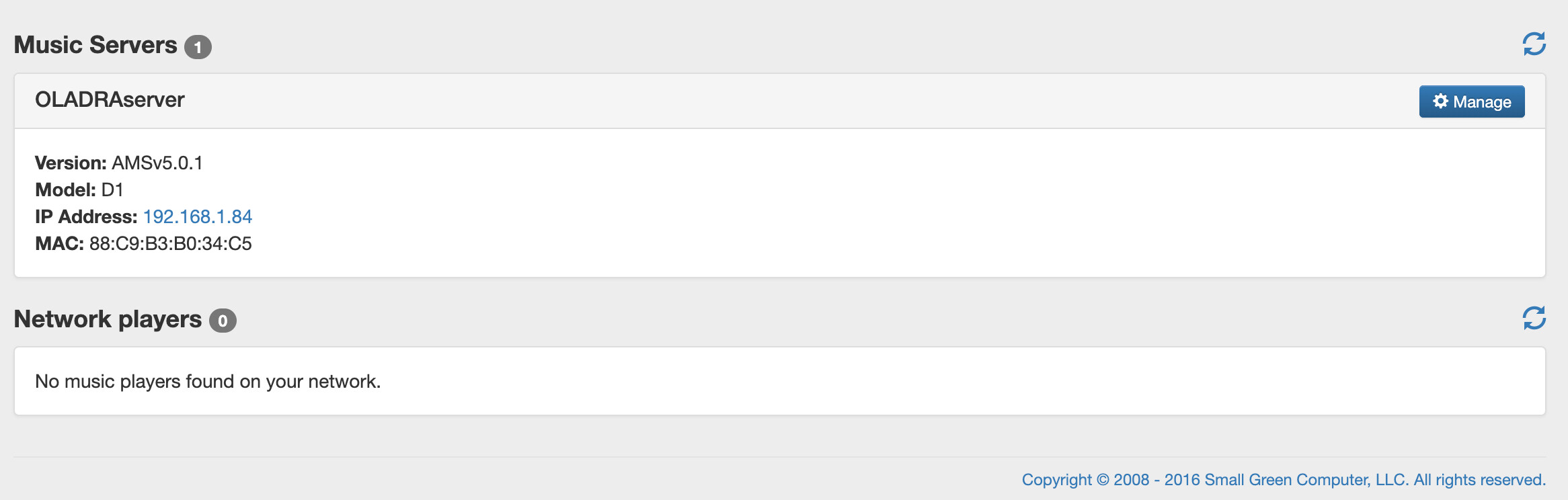
Hi Mark - the reboot of my entire chain back to the router did the trick. Thank you

2 Likes

Unfortunately this came back. Will book a session

Just for everybody’s information: Prince tied this problem to using myantipodes.com citing it as old technology/buggy.
Says we should be using Setup Your Antipodes - Antipodes Products On Your Network. (especially Oladra owners)

That link, Setup your Antipodes- Antipodes Products on your Network, works perfectly for me. I did not know how to get to that page before this link.

1 Like